
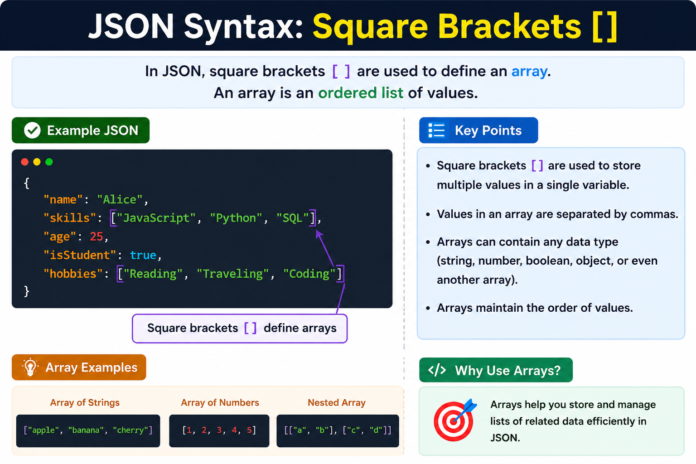

JSON syntax square brackets are one of the most important parts of working with JSON data. If you have ever seen JSON code and noticed values surrounded by [ and ], you have already seen square brackets in action. They are mainly used to create arrays, which allow you to store multiple values in a single JSON structure.
For beginners, JSON can look confusing at first because it uses a specific format for objects, arrays, strings, numbers, and other data types. The good news is that the basic rules are quite simple once you understand what each symbol does. Square brackets are especially easy to learn because their main job is to tell JSON, “These values belong together as a list.”
In this guide, we will explain JSON syntax square brackets, how arrays work, where square brackets are used, common mistakes to avoid, and practical examples that make the concept easier to understand.
What Are JSON Syntax Square Brackets?
In JSON, square brackets [ and ] are used to define an array. An array is a collection of values placed in a specific order. These values can be strings, numbers, Boolean values, objects, other arrays, or even a mixture of different valid JSON values.
For example, a simple JSON array can look like this:
[“Apple”, “Banana”, “Orange”]
The opening square bracket [ tells JSON that the array is starting. The closing square bracket ] tells JSON that the array has ended. The individual values inside the brackets are separated by commas.
This makes square brackets different from curly brackets. In JSON, curly brackets {} are used for objects, while square brackets [] are used for arrays. Understanding this difference is one of the first things beginners should learn when working with JSON.
How Do Square Brackets Work in JSON?
The basic structure of a JSON array is very straightforward. You place an opening square bracket at the beginning, add one or more values separated by commas, and then close the array with a closing square bracket.
For example:
[“Red”, “Green”, “Blue”]
Here, the array contains three string values. Each value is enclosed in double quotation marks because they are strings. The commas separate the individual items.
JSON arrays do not require every value to be the same type. For example, this is also valid JSON:
[“John”, 25, true]
The array contains a string, a number, and a Boolean value. However, when designing real-world JSON Syntax Square Brackets data, keeping arrays logically consistent usually makes the data easier to understand and process.
JSON Square Brackets vs Curly Brackets
One of the most common beginner questions is the difference between square brackets and curly brackets in JSON Syntax Square Brackets. The two symbols have completely different purposes.
Square brackets [] represent an array, while curly brackets {} represent an object. An object stores information using key-value pairs, whereas an array stores an ordered collection of values.
For example, an object might look like this:
{
“name”: “Ali”,
“age”: 20
}
An array, on the other hand, looks like this:
[“Ali”, “Ahmed”, “Usman”]
You can also combine both structures. This is extremely common in APIs and web applications:
{
“students”: [
{
“name”: “Ali”,
“age”: 20
},
{
“name”: “Ahmed”,
“age”: 21
}
]
}
In this example, the students property contains an array. Each item inside that array is an object. This combination makes JSON powerful for representing structured information.
JSON Arrays With Strings
Strings are among the most common values found inside JSON arrays. A string represents text and must be enclosed in double quotation marks.
For example:
[“HTML”, “CSS”, “JavaScript”, “JSON”]
This array contains four programming and web-related terms. Each string is separated by a comma.
It is important to remember that JSON uses double quotes for strings. Using single quotes like this is not valid standard JSON:
[‘HTML’, ‘CSS’, ‘JSON’]
The correct version is:
[“HTML”, “CSS”, “JSON”]
This small difference can cause errors when JSON is being parsed by a program, so it is worth remembering.
JSON Arrays With Numbers
Square brackets can also contain numbers. Numbers in JSON do not need quotation marks.
For example:
[10, 20, 30, 40, 50]
This is an array containing five numbers.
You can also use decimal values:
[10.5, 20.75, 30.25]
JSON Syntax Square Brackets supports both integers and decimal numbers. However, you should not place quotation marks around a number unless you intentionally want it to be treated as a string.
For example:
[10, 20, 30]
contains numbers, while:
[“10”, “20”, “30”]
contains strings.
Although they may look similar when displayed, applications can treat these values differently.
JSON Arrays With Objects
One of the most useful features of JSON Syntax Square BracketsJSON arrays is that they can contain objects. This is commonly used when an application needs to represent a list of users, products, articles, employees, or other records.
For example:
[
{
“name”: “Ali”,
“role”: “Developer”
},
{
“name”: “Sara”,
“role”: “Designer”
},
{
“name”: “John”,
“role”: “Manager”
}
]
The outer square brackets create an array. Inside the array are three objects. Each object contains its own key-value pairs.
This type of structure is frequently used when data is transferred between a server and a website or application. Instead of sending separate pieces of information, a program can send an organized list inside a single JSON Syntax Square Brackets array.
Nested JSON Arrays
JSON Syntax Square Brackets arrays can also contain other arrays. This is known as a nested array. While nested structures can become complicated, they are useful when information has multiple levels.
Here is a simple example:
[
[“Apple”, “Banana”],
[“Carrot”, “Potato”],
[“Rice”, “Wheat”]
]
The outer square brackets contain three inner arrays. Each inner array contains two values.
Nested arrays are useful for representing things such as groups, categories, coordinates, or other data that naturally has multiple levels. However, excessive nesting can make JSON Syntax Square Brackets harder to read, so it is generally better to keep the structure as simple as possible.
Empty JSON Arrays
A JSON array can also be empty. An empty array is written using a pair of square brackets with nothing between them.
[]
This simply means that the array currently contains no values.
Empty arrays are useful in applications where a list may or may not contain data. For example:
{
“name”: “Ali”,
“skills”: []
}
Here, the skills property contains an empty array. The structure is still valid JSON Syntax Square Brackets even though there are no items in the list.
This is different from null. An empty array means there is a list and it currently has zero items, while null generally represents the absence of a value.
Common JSON Square Bracket Mistakes
Beginners often make small syntax mistakes when creating JSON arrays. One common mistake is forgetting to close the array.
Incorrect:
[“Apple”, “Banana”, “Orange”
The closing ] is missing.
Correct:
[“Apple”, “Banana”, “Orange”]
Another common mistake is adding an unnecessary comma after the final item.
Incorrect:
[“Apple”, “Banana”, “Orange”,]
Standard JSON does not allow a trailing comma.
Correct:
[“Apple”, “Banana”, “Orange”]
Another issue is mixing quotation styles. JSON strings should use double quotation marks.
Incorrect:
[‘Apple’, ‘Banana’]
Correct:
[“Apple”, “Banana”]
Paying attention to these small rules can prevent many JSON parsing errors.
How to Access Values Inside a JSON Array
JSON Syntax Square Brackets arrays store values in an ordered sequence. In many programming languages, array positions are counted starting from zero.
For example:
[“Apple”, “Banana”, “Orange”]
The first item is at index 0, the second is at index 1, and the third is at index 2.
So, if a programming language accesses the first item using an index, it would generally use something similar to:
array[0]
The square brackets in programming languages are often used to access an array element. However, it is important to distinguish this from JSON itself. JSON Syntax Square Brackets defines the data structure, while a programming language provides the actual method for reading or modifying that data.
Why JSON Arrays Are Important
JSON Syntax Square Brackets arrays are important because modern applications frequently need to work with collections of information. A website might receive a list of products from an API, while a mobile application might receive a list of users or notifications.
Without arrays, developers would have to create separate properties for every individual item. That would make data much harder to organize.
For example, instead of creating:
{
“student1”: “Ali”,
“student2”: “Ahmed”,
“student3”: “Sara”
}
a cleaner structure could be:
{
“students”: [“Ali”, “Ahmed”, “Sara”]
}
The second structure clearly shows that the students are a collection of related values.
Best Practices for Using JSON Square Brackets
When working with JSON Syntax Square Brackets arrays, a few simple practices can make your data cleaner and easier to maintain.
First, use arrays when you are representing a list or collection of values. If you are describing one entity with several properties, an object is usually more appropriate.
Second, keep the structure consistent. If an array represents a list of products, each item should ideally follow the same general structure.
For example:
[
{
“name”: “Laptop”,
“price”: 800
},
{
“name”: “Phone”,
“price”: 500
}
]
Finally, format your JSON with proper indentation. Well-formatted JSON Syntax Square Brackets is much easier for humans to read and debug, especially when arrays contain multiple objects or nested structures.
Frequently Asked Questions
What do square brackets mean in JSON?
Square brackets [] represent an array in JSON. They are used to store an ordered collection of values.
Can a JSON array contain objects?
Yes. JSON Syntax Square Brackets arrays can contain objects, strings, numbers, Boolean values, null values, or other arrays. Arrays containing objects are very common in APIs.
Can a JSON array be empty?
Yes. An empty JSON array is written as []. It is completely valid JSON.
Do JSON arrays allow trailing commas?
No. Standard JSON does not allow a comma after the final item in an array.
What is the difference between [] and {} in JSON?
[] represents an array, while {} represents an object. Arrays contain ordered values, whereas objects contain key-value pairs.
Conclusion
Understanding JSON syntax square brackets is essential for anyone learning JSON Syntax Square Brackets, APIs, web development, or data exchange. The basic idea is simple: square brackets [] are used to create arrays, which store multiple values in an ordered collection.
Once you understand this rule, many JSON Syntax Square Brackets structures become much easier to read. You can create simple arrays containing strings or numbers, as well as more advanced structures containing objects and nested arrays.
The key is to remember the basic syntax: start the array with [, separate values with commas, and finish it with ]. Avoid common mistakes such as trailing commas, missing brackets, and incorrect quotation marks. With a little practice, JSON Syntax Square Brackets arrays will quickly become one of the easiest parts of working with structured data.
You May Also Read: Molly Little Age: How Old Is She in 2026?