
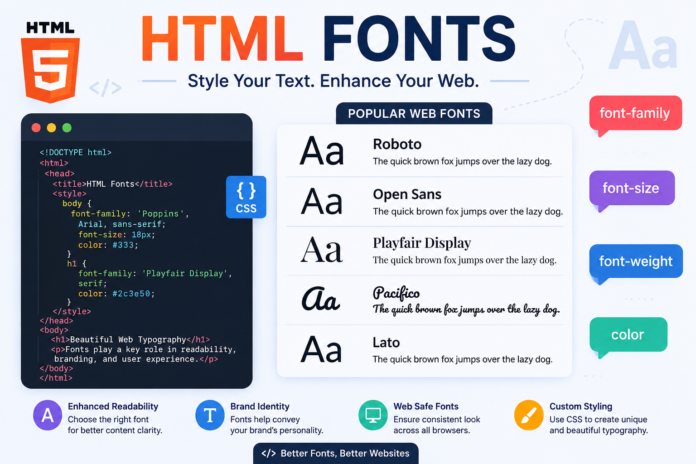

HTML Fonts If you are building a website, you have probably noticed that fonts can completely change how a page looks and feels. A clean font can make a website easier to read, while a creative font can give it a unique personality. This is where HTML fonts become important. Fonts help you control the appearance of text and make your website more attractive, readable, and professional.
Although HTML is mainly used to structure a webpage, fonts are usually controlled with CSS. Modern web development gives you many ways to choose font families, change font sizes, adjust text weight, and even load custom fonts from online font libraries. Understanding how HTML fonts work can help beginners create better-looking websites without needing complicated coding skills.
In this guide, we will explain what HTML fonts are, how to change fonts in HTML, how CSS works with fonts, popular font types, custom web fonts, and useful tips for choosing the right font for your website.
What Are HTML Fonts?
HTML fonts refer to the fonts used to display text on an HTML webpage. Every time you add a heading, paragraph, button, menu item, or other text to a webpage, the browser needs to decide which font should be used to display it.
In modern websites, font styling is usually handled with CSS rather than HTML itself. HTML provides the structure of the content, while CSS controls its visual appearance. For example, you can use an HTML <p> element to create a paragraph and CSS to decide whether that paragraph should use Arial, Verdana, Georgia, or another font.
This separation between HTML and CSS makes websites easier to manage. Instead of adding font settings to every individual piece of text, you can create one CSS rule and apply it across the entire website.
How to Change Fonts in HTML
There are several ways to change the font of text on an HTML page. The most common modern approach is to use the CSS font-family property.
For example:
<p style=”font-family: Arial;”>This paragraph uses Arial.</p>
Here, the inline CSS tells the browser to display the paragraph using Arial. This method is easy for beginners, but it is not always the best choice for a large website because repeating inline styles can make your HTML messy.
A better approach is to place the styling in a CSS section:
<style>
p {
font-family: Arial, sans-serif;
}
</style>
Now every paragraph on the page will use Arial. You can also create separate rules for headings, navigation menus, buttons, and other elements.
Using the CSS Font-Family Property
The font-family property is one of the most important tools for working with HTML fonts. It tells the browser which typeface should be used for an element.
For example:
body {
font-family: Arial, sans-serif;
}
The browser will first try to use Arial. If Arial is not available, it will use another suitable sans-serif font.
Using a backup font is a smart habit in web development. Different devices and operating systems may not have exactly the same fonts installed. A fallback gives the browser another option when the preferred font cannot be loaded.
You can also provide several fonts:
body {
font-family: “Trebuchet MS”, Arial, sans-serif;
}
This means the browser will try Trebuchet MS first, then Arial, and finally a generic sans-serif font.
Common Types of HTML Fonts
Fonts can generally be grouped into different categories. The two most common categories used on websites are serif and sans-serif fonts.
Serif fonts have small decorative strokes at the ends of letters. Examples include Georgia and Times New Roman. They can give websites a traditional, formal, or editorial appearance and are often used for articles and headings.
Sans-serif fonts do not have those decorative strokes. Arial, Helvetica, and Verdana are common examples. They usually have a clean and modern appearance, which makes them popular for websites, applications, and user interfaces.
Another category is monospace fonts. In these fonts, each character generally takes up the same amount of horizontal space. Monospace fonts are especially useful for displaying programming code because the characters line up neatly.
HTML Fonts and Font Size
Choosing a font is only part of good typography. You also need to control how large the text appears. CSS provides the font-size property for this purpose.
For example:
p {
font-size: 16px;
}
This makes the paragraph text 16 pixels in size.
However, modern responsive websites often use relative units such as rem instead of relying only on pixels. For example:
p {
font-size: 1rem;
}
Relative units can make typography easier to scale across different screen sizes and accessibility settings.
Headings should generally be larger than normal paragraph text. A clear difference between headings and body text helps visitors scan your content quickly.
How to Make HTML Fonts Bold or Italic
CSS also lets you change the weight and style of fonts. The font-weight property controls how thick the characters appear.
For example:
h1 {
font-weight: 700;
}
You can also use keywords such as:
strong {
font-weight: bold;
}
For italic text, use the font-style property:
em {
font-style: italic;
}
These options can be useful for highlighting important information without changing the font family itself. However, it is best to avoid excessive bold or italic formatting because it can make a page harder to read.
Using Google Fonts With HTML
One of the easiest ways to add more font choices to a website is by using Google Fonts. It provides a large collection of fonts that developers can use on websites.
For example, a website can load a selected font and then use it through CSS:
body {
font-family: “Roboto”, sans-serif;
}
The exact setup depends on the font and the way you choose to load it. Once the font is available to the browser, the font-family property determines where it should be applied.
Custom web fonts can give a website a distinctive appearance. They are especially useful for branding, blogs, portfolios, online stores, and other websites where visual identity matters.
Web-Safe Fonts Explained
Web-safe fonts are fonts that are commonly available across different computers and devices. Using them can reduce the chance that your website will look dramatically different from one device to another.
Some familiar examples include Arial, Georgia, Times New Roman, and Verdana. These fonts have been used on websites for many years and are widely supported.
That does not mean web-safe fonts are always the best choice. Modern browsers can load many additional fonts through web font services or locally hosted font files. The important thing is to provide sensible fallback fonts so your content remains readable if the preferred font cannot load.
How to Choose the Best HTML Fonts
Choosing the right font is not simply about picking the one that looks attractive. You should also think about readability, branding, screen size, and the type of content you are publishing.
For a blog or information website, readability should be a top priority. A simple, well-spaced font can make long articles much easier to read. Decorative fonts may look interesting in a logo or short heading, but they can become tiring when used for large blocks of text.
You should also consider your audience. A professional business website may benefit from a clean and trustworthy typeface, while a creative portfolio might use a more distinctive font for headings. The font should support the website’s purpose rather than distract visitors from the content.
HTML Fonts and Website SEO
Fonts can indirectly affect SEO because typography is closely connected to user experience. Search engines aim to provide useful pages, and a website that is difficult to read may create a poor experience for visitors.
Large or unnecessarily heavy font files can also affect page performance. If a webpage takes too long to load, visitors may leave before reading the content. For this reason, website owners should avoid loading a large number of unnecessary font families and font weights.
Good typography should support fast loading, clear content, and easy navigation. Using a limited number of carefully selected fonts is usually better than adding many different styles simply for decoration.
Responsive HTML Fonts for Mobile Devices
A website can look great on a desktop but still have typography problems on smartphones. Responsive design helps ensure that text remains comfortable to read on different screen sizes.
CSS media queries can be used to adjust typography when necessary:
body {
font-size: 18px;
}
@media (max-width: 600px) {
body {
font-size: 16px;
}
}
This example changes the base font size on smaller screens. The ideal values depend on the website’s design and audience.
It is also important to pay attention to line height and spacing. Text that is too tightly packed can be difficult to follow, particularly on mobile screens.
Best Practices for Using HTML Fonts
There are a few simple rules that can make your website typography much better. First, choose fonts that are easy to read. Your visitors should not have to struggle to understand your content.
Second, avoid using too many font families. Two complementary fonts are often enough for a clean website. For example, you could use one font for headings and another for body text.
Third, make sure there is enough contrast between your text and its background. Typography and color work together to determine how easily visitors can read your page.
Finally, test your fonts on different devices and browsers. A font may look slightly different on Windows, macOS, Android, and iOS, so checking your website on multiple screens is a useful part of the design process.
HTML Fonts vs CSS Fonts
It is common for beginners to think that HTML Fonts itself controls every aspect of fonts. In older HTML versions, elements such as <font> were used to control text appearance. However, the <font> element is obsolete in modern HTML.
Today, the recommended approach is to use HTML for structure and CSS for presentation.
For example:
<h1>Welcome to My Website</h1>
And then:
h1 {
font-family: Georgia, serif;
font-size: 36px;
}
This approach keeps the code cleaner and follows modern web development practices.
Frequently Asked Questions About HTML Fonts
What are HTML fonts?
HTML fonts are the typefaces used to display text on HTML Fonts webpages. In modern web development, CSS is normally used to control font family, size, weight, style, and spacing.
How do I change a font in HTML?
You can change fonts by using CSS and the font-family property. For example, body { font-family: Arial, sans-serif; } applies Arial as the primary font to the page.
Can I use custom fonts in HTML?
Yes. Custom fonts can be used on websites by loading web font files or using services such as Google Fonts. CSS is then used to apply the selected font to HTML Fonts elements.
Is the HTML <font> tag still recommended?
No. The <font> element is obsolete and should not be used in modern website development. CSS provides a cleaner and more flexible way to control typography.
Which font is best for a website?
There is no single best font for every website. The right choice depends on your content, brand, audience, and design. The most important factors are readability, performance, and consistency.
Conclusion
HTML fonts play an important role in creating websites that look professional and feel comfortable to use. While HTML Fonts provides the structure for your content, CSS gives you the tools needed to control fonts, sizes, weights, styles, and spacing.
For most modern websites, the best approach is to keep your HTMLHTML Fonts clean and use CSS for typography. Choose readable fonts, provide suitable fallbacks, avoid unnecessary font files, and make sure your typography works well on both desktop and mobile screens.
Whether you are creating a personal blog, business website, portfolio, or online store, good font choices can make a noticeable difference. You do not need dozens of fonts to create an impressive design. A small selection of well-matched, readable fonts is usually more effective—and better for both user experience and website performance.
You May Also Read: JSON Syntax Square Brackets: A Simple Guide for Beginners