
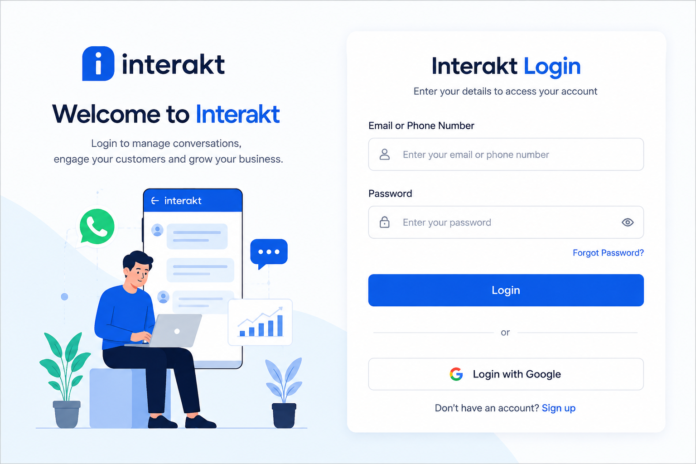

If you are searching for Interakt login, you probably want a quick and simple way to access your Interakt dashboard. Whether you use Interakt for WhatsApp Business communication, customer support, marketing campaigns, or team conversations, getting into your account is the first step.
The good news is that the Interakt login process is straightforward. You can access your account from a web browser using your registered email address and password, and Interakt also provides a Google sign-in option. If you have forgotten your password, there is a password-reset process that lets you recover access through your registered email address.
In this guide, we will explain how to complete the Interakt login, what to do if you cannot sign in, how to reset your password, and some useful tips for keeping your account secure. The goal is simple: help you reach your dashboard without unnecessary confusion.
What Is Interakt?
Interakt is a customer engagement platform designed to help businesses communicate with customers, particularly through WhatsApp. Its tools can help businesses manage conversations, marketing communication, customer support, and sales-related activities from a centralized platform.
One of the useful features of Interakt is its shared communication environment. Instead of relying on one person to manage every customer conversation, businesses can use tools designed for team-based communication. This can make it easier for different team members to handle customer questions and follow up on conversations.
Interakt also provides mobile access, allowing users to stay connected with their business communication while away from a computer. Its current app listing describes features such as a shared team inbox and multi-agent support for WhatsApp Business.
How to Complete Interakt Login
The Interakt login process is designed to be simple. Before you begin, make sure you have access to the email address associated with your Interakt account and know your account password.
Start by opening the official Interakt website or going directly to the Interakt login page. Interakt’s current login instructions identify app.interakt.ai/login as the direct web login address.
Once the login page opens, enter the email address you used when registering your account. Enter your password in the appropriate field and select the sign-in option. If your details are correct, you should be taken to your Interakt workspace.
Interakt also supports signing in through Google. If you previously created or connected your account using Google, this can be a convenient alternative to entering your password manually.
Interakt Login Step-by-Step
For beginners, the process can be broken down into a few easy steps.
First, open a trusted web browser such as Chrome, Edge, Firefox, or Safari. Then visit the official Interakt login page rather than using an unfamiliar website or a link from an unknown source.
Next, enter your registered email address and password. Double-check the spelling of your email address because even a small typing error can prevent a successful login. If you normally use Google authentication, choose the Google login option instead.
Finally, click the sign-in button and wait for your dashboard to load. Once you are inside your account, you can access the features and workspace associated with your Interakt account.
How to Reset Your Interakt Password
Forgetting a password is common, especially when you manage several business accounts. Fortunately, Interakt provides a password recovery option on its login page.
If you cannot remember your password, select the Forgot Password option on the Interakt login page. You will generally be asked to provide the email address associated with your account. Interakt then sends a password-reset message to that registered email address.
Open your email inbox and look for the password-reset message. If you do not see it immediately, check your spam or junk folder. After opening the legitimate reset email, follow the instructions to create a new password.
Once the password has been changed, return to the Interakt login page and sign in using your email address and new password. It is a good idea to choose a password that is difficult for other people to guess and avoid sharing it with anyone.
Why Is My Interakt Login Not Working?
Sometimes the login process does not work even when you believe your details are correct. In many cases, the problem is caused by something simple such as an incorrect password, browser issue, or typing mistake.
Start by checking your email address carefully. Make sure there are no extra spaces and that you are using the email connected to your Interakt account. Then carefully re-enter your password.
If you still cannot access the account, use the password-reset option instead of repeatedly entering different passwords. Interakt’s official guidance specifically recommends using the reset-password process when a user has forgotten their login password.
Common Interakt Login Problems and Solutions
Incorrect Email or Password
An incorrect email or password is one of the most common reasons for a failed login. Check that you are using the email address registered with your Interakt account.
If you recently changed your password, make sure you are entering the new password rather than an older saved password. Browser password managers can sometimes automatically fill outdated information, so manually checking the fields can help.
If you cannot remember the correct password, use the official password-reset option. This is safer and faster than repeatedly guessing your credentials.
Password Reset Email Not Arriving
If you requested a password reset but cannot find the email, check your spam or junk folder first. Automated emails can occasionally be filtered there.
Also make sure you entered the correct email address. If you have multiple email accounts, think about which address you originally used when creating your Interakt account.
If the message still does not appear, give the email system a little time and try the recovery process again. For account-specific problems, Interakt’s support resources are the appropriate place to seek additional assistance.
Browser Problems
Sometimes the account itself is fine, but the browser causes problems. An outdated browser session, cached information, or browser extension can interfere with a website.
Try refreshing the page first. If that does not help, open the Interakt login page in a private or incognito window. You can also try another modern browser to determine whether the problem is browser-specific.
If the website works normally in another browser, clearing cached website data or checking browser extensions may help resolve the issue.
Is Interakt Login Available on Mobile?
Yes. Interakt provides mobile access for businesses that want to stay connected while away from their desktop. Its current materials mention mobile apps, and the Interakt app is available through major mobile app stores.
Mobile access can be particularly useful for teams that need to respond to customer conversations quickly. Instead of waiting until someone returns to a computer, authorized team members can use the supported mobile application.
When installing an app, make sure you are downloading the official Interakt application from a trusted app store. Check the developer information and app details before entering your account credentials.
What Can You Do After Interakt Login?
Once you successfully complete the Interakt login, the available tools depend on your account and workspace. Interakt is designed around customer communication and business engagement.
Businesses can use the platform to manage WhatsApp-related customer conversations and team communication. Interakt also promotes features for marketing automation, customer support, sales communication, and analytics.
For teams, a centralized workspace can make customer communication easier to organize. Multiple authorized users can work with conversations rather than keeping every customer interaction tied to one individual.
Interakt Login Security Tips
Account security is important, particularly when an account is connected to business conversations and customer information. Never share your Interakt password publicly or send it to someone through an unsecured message.
Use a strong, unique password that you do not reuse across other websites. If you believe someone else may know your password, change it through your account settings or use the official recovery process.
You should also be careful with links claiming to provide an Interakt login page. When entering your business credentials, use the official Interakt website and verify the web address before signing in.
Interakt Login vs. Sign Up
It is easy for new users to confuse login and sign-up. They serve two different purposes.
Login is for people who already have an Interakt account. You use your existing credentials to access your workspace.
Sign up, on the other hand, is for creating a new account. Interakt’s current sign-up page provides options to register using Google or email and includes a 14-day trial for its paid plans.
If you already have an account, look for the login option rather than creating another account. Creating duplicate accounts can make it harder to determine which workspace contains your business information.
Frequently Asked Questions About Interakt Login
What is the Interakt login page?
The Interakt login page is the web page used by existing users to access their Interakt workspace. Interakt’s current documentation identifies app.interakt.ai/login as the direct login address.
Can I log in to Interakt with Google?
Yes. Interakt’s current login instructions state that users can sign in using Google as an alternative to entering their email address and password.
What should I do if I forget my Interakt password?
Select the Forgot Password option on the login page and provide your registered email address. Interakt sends instructions for creating a new password to that email address.
Can I use Interakt on my phone?
Yes. Interakt provides mobile applications so businesses can stay connected with customer communication while using a mobile device.
Why can’t I log in even though my password is correct?
Check your email address, browser session, and internet connection first. You can also try an incognito window or another browser. If the problem continues, use Interakt’s official support resources for account-specific assistance.
Final Thoughts
The Interakt login process is relatively simple once you know where to go. Existing users can access the web dashboard with their registered email and password or use Google sign-in where available. If you forget your password, the built-in recovery process provides a straightforward way to regain access.
For the smoothest experience, always use the official Interakt website, keep your login information secure, and avoid sharing your credentials. If a browser or password problem prevents you from signing in, work through the basic troubleshooting steps before contacting support.
Once you are logged in, Interakt gives businesses a centralized environment for managing customer communication and WhatsApp-focused engagement. That makes understanding the login process useful not only for accessing your account, but also for getting the most from the platform.
You May Also Read: HTML Fonts: A Complete Guide to Styling Text on Websites