
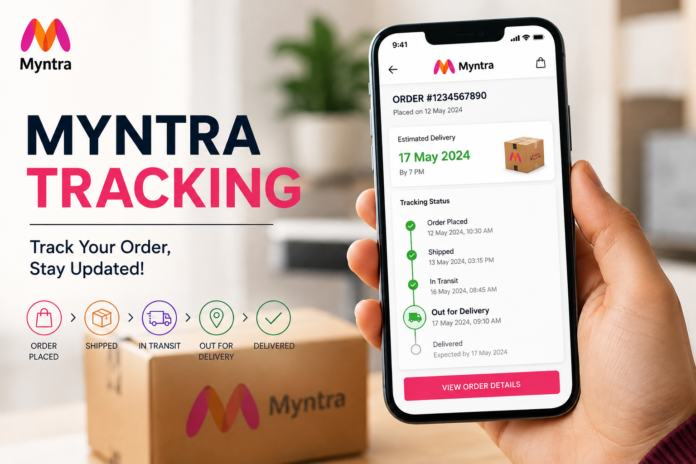

Myntra Tracking Online shopping is convenient, but there is always one question that comes up after placing an order: “Where is my package right now?” If you have recently ordered something from Myntra, the Myntra tracking feature can help you check your order status and estimated delivery details without much effort.
Myntra is one of India’s well-known fashion and lifestyle shopping platforms, offering clothing, footwear, accessories, beauty products, and other lifestyle items. Once an order has been placed, customers can follow its progress through their Myntra account. Understanding how tracking works can make the waiting period much less confusing, especially when an order moves through several delivery stages.
In this guide, we will explain everything you need to know about Myntra tracking, including how to track an order, what different status messages mean, what to do when tracking information is not updating, and how to deal with delivery delays. The goal is to keep the process simple so you can quickly find the information you need.
What Is Myntra Tracking?
Myntra tracking is the system that allows customers to monitor the progress of their online orders. After you purchase a product, the order goes through different stages before reaching your delivery address. Tracking helps you understand where your order is in that process.
Depending on the order stage, you may see updates such as Order Confirmed, Packed, Shipped, Out for Delivery, or Delivered. These updates give you a general idea of what is happening with your package and whether it is moving toward the expected delivery date.
Tracking is particularly useful when you are waiting for an important item. Instead of repeatedly checking your door or wondering whether the courier has picked up the package, you can look at the latest available status from your Myntra account.
How to Track Your Myntra Order
The easiest way to track a Myntra order is through the Myntra website or mobile application. You generally need to sign in using the account that was used to place the order.
Once you are logged in, open the Orders or My Orders section. You should see your recent purchases listed there. Select the order you want to check, and the order details page should display the latest tracking information available for that shipment.
Look for an option related to Track Order or shipment tracking. The page may show the current status, delivery progress, and an estimated delivery date. The exact appearance of the tracking page can change as Myntra updates its website or app, but the basic process remains straightforward.
Myntra Tracking Through the Mobile App
Many shoppers prefer using the Myntra app because it keeps order information in one place. After opening the app, sign in to your account and navigate to your orders.
Find the product you want to track and open its order details. From there, you can view the current shipment status and other available delivery information. If the order has already been shipped, tracking may provide additional information about its movement.
Keeping notifications enabled can also be useful. Myntra or its delivery partners may send updates when the order is shipped, out for delivery, delivered, or affected by a delivery issue.
Myntra Tracking Through the Website
If you prefer shopping from a computer, you can track your order through the Myntra website. Sign in to the same account you used when placing the order and go to your order history.
Select the relevant order to see its details. The tracking section should provide the latest available information about the shipment. Depending on the courier and shipping stage, additional tracking details may become available after the package has been dispatched.
If you cannot immediately see a detailed tracking update, do not assume that something is wrong. Newly placed orders may take some time to move from order processing to shipment tracking.
Understanding Myntra Order Statuses
Myntra order tracking can display several different statuses. Knowing what they mean makes tracking much easier.
Order Confirmed
Order Confirmed generally means that the order has been successfully placed and accepted for processing. At this point, the seller or fulfillment team still needs to prepare the product for dispatch.
There may not be detailed courier information at this stage because the package has not necessarily been handed over to a delivery partner.
Order Packed
When an order shows Packed, it usually means the product has been prepared and packaged for shipment. This is a positive sign because the order has moved beyond the initial processing stage.
However, packed does not necessarily mean the package is already traveling. The shipment may still need to be collected by the courier.
Shipped
A Shipped status generally means the package has been dispatched and is moving through the delivery network. More detailed tracking information may become available around this stage.
The shipment can pass through sorting centers or other logistics facilities before reaching the destination city.
Out for Delivery
Out for Delivery is one of the statuses customers usually look forward to seeing. It generally means the package has reached the local delivery stage and has been assigned for delivery.
Although delivery is often completed the same day, timing can vary depending on the courier’s route, traffic, weather, and other operational factors.
Delivered
When the tracking status changes to Delivered, the shipment has been recorded as delivered. If you cannot find the package even though it shows as delivered, check whether someone else at your home or building accepted it.
If the package is still missing, contacting Myntra customer support promptly is a sensible next step.
Why Is My Myntra Tracking Not Updating?
Sometimes customers check their order repeatedly and notice that the tracking information has not changed. This does not always indicate a problem.
One common reason is that the package is between scanning points. Courier companies typically update shipment information when a package reaches certain facilities or passes specific checkpoints. During the time between those scans, the tracking page may appear unchanged.
Another possibility is that the order has recently been shipped and the courier’s system has not yet received or processed the latest scan. Technical delays can also temporarily affect tracking information.
If the status remains unchanged for an unusually long period, especially beyond the expected delivery date, it is worth contacting Myntra Tracking support and asking them to check the shipment.
Myntra Tracking Shows a Delay
Delivery estimates are useful, but they are not always guaranteed. Orders can occasionally be delayed because of high order volumes, weather conditions, transportation problems, operational issues, or other circumstances affecting the delivery network.
If your tracking page shows a delay, first check the latest estimated delivery date. Sometimes the package continues moving even though the delivery date has changed.
If there are no meaningful updates for an extended period, contact customer support. Keep your order number available because it can help the support team locate your shipment more quickly.
What to Do If Your Myntra Order Is Late
If your Myntra Tracking order has passed its expected delivery date, start by checking the tracking page again. Look for the latest shipment update and see whether a new estimated date has been provided.
If the package is still moving, it may simply be experiencing a delivery delay. You can continue monitoring the order while waiting for the updated delivery estimate.
However, if there has been no tracking movement or the shipment appears to be stuck, contacting Myntra Tracking support is the better option. Explain the issue clearly and provide your order details so the support team can investigate the shipment.
Can You Track a Myntra Order Without Logging In?
For security and privacy reasons, order tracking is generally connected to the account used to place the purchase. The most reliable method is therefore to sign in and open your order history.
If you have received a shipping notification containing courier information, there may also be shipment details available through the relevant delivery partner. However, customers should be careful with unofficial tracking websites or messages asking for sensitive personal information.
Always use Myntra’s official channels or trusted courier information when checking an order.
Is Myntra Tracking Accurate?
Myntra tracking is designed to provide customers with current shipment information, but tracking updates are not necessarily instantaneous. There can be a gap between a package physically moving and the corresponding information appearing online.
For example, a shipment may leave one facility but not receive another scan until it reaches the next checkpoint. During that period, the tracking page may show the previous location.
Therefore, it is better to treat tracking as an indication of shipment progress rather than a live GPS location of your package.
Tips for a Smoother Myntra Delivery Experience
Before placing an order, make sure your delivery address and contact details are correct. A small mistake in an address or phone number can create unnecessary delivery problems.
It is also helpful to keep your order confirmation and order number available until the package has been successfully delivered. These details can make it easier to resolve problems if you need customer support.
Finally, check the tracking information through the official Myntra Tracking app or website instead of relying on random links received through messages or social media. This simple habit can help protect your account and personal information.
Myntra Tracking vs Courier Tracking
Myntra tracking and courier tracking can sometimes provide similar information, but they serve slightly different purposes. Myntra Tracking gives you order-related information, while the courier’s tracking system may provide additional shipment scans after the package has been dispatched.
In some cases, the courier tracking page may show a more detailed movement history. This can be helpful when you want to understand why a shipment has taken longer than expected.
Still, Myntra Tracking should generally be your first place to check because it connects the shipment information with your order details, product information, and estimated delivery date.
Frequently Asked Questions About Myntra Tracking
How can I track my Myntra order?
Sign in to your Myntra account and open the Orders section. Select the relevant purchase and look for the tracking or order-status information.
Why is my Myntra order not showing tracking details?
If the order was recently placed or has not yet been dispatched, detailed courier tracking may not be available. Tracking information can become more detailed after the package is shipped.
What does “Out for Delivery” mean on Myntra?
It generally means the package has reached the local delivery stage and has been assigned for delivery. The actual delivery time can vary depending on the courier route and local conditions.
What should I do if my Myntra order is delayed?
Check the latest tracking update and revised delivery estimate first. If there is no progress or the order is significantly late, contact Myntra customer support with your order details.
Can I track my Myntra order on my phone?
Yes. You can use the Myntra mobile app to access your orders and view available shipment tracking information.
Final Thoughts on Myntra Tracking
Myntra tracking makes it much easier to keep an eye on an online order from the moment it is confirmed until it reaches your doorstep. While tracking updates may not always appear instantly, the order-status system provides useful information about where your purchase stands in the delivery process.
The easiest approach is to check your order through the official Myntra Tracking app or website, understand the meaning of each status, and avoid worrying about short gaps between updates. If an order becomes significantly delayed or the tracking information stops progressing for an extended period, contacting customer support is the most practical solution.
For regular Myntra Tracking shoppers, understanding how tracking works can save time and make online shopping feel much more predictable. Instead of guessing where your package is, you can simply check the latest available status and plan around the expected delivery.
You May Also Read: Flipkart Tracking