
Remote work is now a standard part of enterprise IT. Help desks, cloud operations, and development teams often work across several time zones on managed devices. In that setting, remote employee monitoring software gives managers a consistent record of time, activity, and project effort.
The market covers very different products. Some tools focus on time tracking and productivity reports, while others focus on security, data loss prevention, and insider risk. Enterprise buyers also weigh platform coverage, privacy controls, deployment options, and per-seat cost across hundreds of users.
In this guide, you will see how eight tools handle enterprise needs and which ones offer a free plan or trial. You will also learn what separates a good fit from a costly mistake.
Quick Answer
Apploye is the best remote employee monitoring software for enterprise IT teams that need clear time, activity, and project data without heavy security tooling. This employee monitoring platform combines automatic time tracking, screenshots, screen recording, app and URL logs, and reporting.
It also offers a free plan for small groups and a free trial, so you can test it before rollout. Paid plans start at $4.50 per user per month on annual billing.
Teramind and Veriato suit security teams that need data loss prevention and insider risk tools. ActivTrak offers a free plan for up to three users. Hubstaff, Insightful, Time Doctor, and DeskTime are solid options for time tracking and productivity analytics. Your best choice depends on whether you need visibility, security forensics, or both.
How to Choose the Best Remote Employee Monitoring Software for Enterprise IT
A good decision starts with your goal, not a feature list. These six checks help you narrow the field quickly.
- Match the tool type to your goal:
Time and productivity tools answer how work hours are spent. Security tools answer who touched which data. Decide which question matters most before you start a trial.
- Check device coverage
Enterprise IT teams run Windows, macOS, and Linux workstations, plus mobile devices. Confirm the agent works on every device you manage.
- Review security and compliance
Look for GDPR and HIPAA support, SOC 2 reports, and single sign-on where your policy requires them. Ask each vendor for documents, not promises.
- Look at privacy controls
Random screenshots, employee access to their own data, and clear notices keep the program fair. These features protect trust as much as they protect data.
- Test scale and admin controls
Roles, teams, integrations with tools like Jira, and an API matter once you manage hundreds of users. Make sure the monitoring app you choose has integration with all required project management platforms.
- Calculate total cost.
Check seat minimums, add-ons, and annual billing rules. A free plan or trial helps you run a pilot. Still, remote employee monitoring software free plans usually limit users or data history, so plan your paid tier early.
One more point matters here. Do not confuse these tools with IT remote monitoring software such as RMM platforms. Those tools watch servers and endpoints, while the employee monitoring and time tracking tools show tracked hours with payroll, billing and invoicing, and how people spend working time.
Quick Overview Table
The table below gives a quick view of each tool’s strength.
| Tool | Main Strength | Best For | Free Option |
| Apploye | Time, activity, screenshots, and payroll in one platform | Enterprise IT teams that need clear visibility at a fair cost | Free plan (up to 10 users) and 10-day trial |
| Teramind | Data loss prevention and user activity monitoring | Security-led and regulated teams | Free trial |
| ActivTrak | Workforce analytics and productivity insights | Teams that want behavior trends | Free plan (up to 3 users) |
| Insightful | Productivity analytics with automation | Mid-size to large remote teams | Free trial |
| Hubstaff | Time tracking with GPS, scheduling, and payroll | Distributed teams with field staff | Free trial |
| Time Doctor | Time tracking with distraction alerts | Remote teams that need detailed reports | 14-day free trial |
| DeskTime | Automatic time tracking and productivity scores | Budget-conscious teams | Free trial |
| Veriato | Insider risk management and behavior analytics | Security and compliance teams | Demo on request |
Best Remote Employee Monitoring Software for Enterprise IT
The eight tools below suit enterprise IT needs in different ways. Let’s see how they help an IT manager see how his team’s time is spent on the relevant projects.
1. Apploye: Best Overall for Enterprise IT
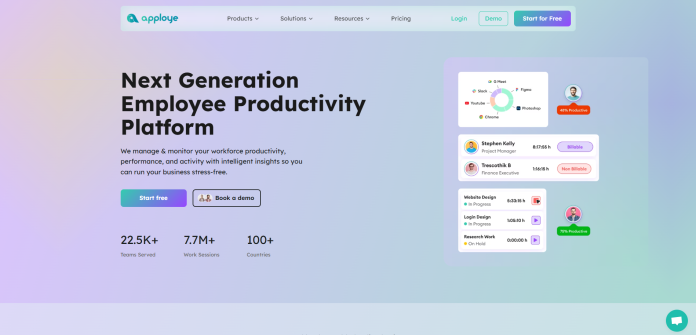
Apploye is a remote employee monitoring software that records how your distributed team spends its working hours. It combines time tracking, activity data, and project reporting in one platform, so you do not need separate tools for each job.
For enterprise IT, one dashboard answers the questions you ask every day. You can see who is working right now, which project they are on, and which apps and websites they use. Idle time detection and activity levels, based on keyboard and mouse use, show how each session went. Screenshots, taken at random intervals or on demand, and full-session screen recording give you evidence when you need it.
The data also supports your wider operations. Project budgets, timesheet approvals, payroll, and invoicing sit in the same workspace, and reports export as PDF or CSV. Integrations with Jira, Trello, Asana, and ClickUp keep work and hours connected.
Apploye is a cross-platform tool that works on Windows, macOS, and Linux, with mobile and Chrome options for flexible schedules. Apploye is GDPR and HIPAA-compliant, and employees can add notes to their screenshots. That gives you context before you conclude and keeps the process fair for the people you manage.
Key Features
- Automatic time tracking with idle time detection and timesheet approval
- Random screenshots, up to 60 per hour, across multiple monitors
- Instant screenshots and a live feed that shows who is working now
- Full-session screen recording for deeper review
- App and URL tracking with productivity labels
- Activity levels based on keyboard and mouse use
- Projects, budgets, tasks, attendance, automatic payroll, and invoicing
- Reports you can export as PDF and CSV
- Integrations with Jira, Trello, Asana, Zoho, ClickUp, Zapier, PayPal, and other APIs
- GDPR and HIPAA compliance
Pricing
- Apploye offers a free Starter plan for up to 10 users, which works well for a pilot group.
- Paid plans start at $4.50 per user per month for Elite and $8 for Power on annual billing.
- Enterprise pricing is custom based on your needs.
For all paid plans, you will get a 10-day free trial that requires no credit card. So, you can check what you are going to pay for, and simply cancel the deal before paying if it doesn’t meet your criteria.
Pros of Apploye:
- Low per-seat cost with a free starting plan
- Full-session screen recording plus screenshots
- Payroll, invoicing, and project budgets in the same platform, so it saves you time and resource costs.
- Privacy-friendly settings that support employee trust
- Works on Windows, macOS, Linux, Android, and Chrome
- The interface is clean and easy to start with, no prior training required
Cons of Apploye:
- Less depth in data loss prevention and insider risk analytics than security-first tools
- Large enterprises should confirm single sign-on and certification needs with the sales team
Best For
IT operations, help desk, and development teams that want clear time and activity data at a fair cost. If you also hire outside specialists, Apploye’s time tracking software for consultants logs billable hours in the same workspace.
2. Teramind
Teramind is a security-first platform that combines user activity monitoring, insider threat detection, and data loss prevention. It suits organizations that handle sensitive data and must show control over how that data moves.
Teramind records user activity, applies behavior rules, and raises alerts when actions break policy. Higher tiers add keystroke logging, file and email monitoring, risk scoring, and anomaly detection.
You can deploy it in the cloud or on-premises, which matters for regulated enterprises. Setup and policy tuning take more effort than simpler tools.
Pros: Deep security and DLP features, flexible deployment, and detailed forensic records.
Cons: Higher cost, a five-seat minimum for the starter paid plan, and limited focus on basic time tracking and attendance.
Pricing: The pricing plan of Teramind starts at about $15 per seat per month, with security tiers near $35. There is no free plan, but a free trial is available, and enterprise quotes come from sales.
Best for: Security and compliance teams in finance, healthcare, and government.
3. ActivTrak
ActivTrak is a workforce analytics platform that turns activity data into productivity and workload insights. It focuses on team-level patterns rather than close review of individual screens.
ActivTrak tracks app and website use, then builds reports on focus time, workload, and engagement trends. Screenshots and live screen views come through a paid add-on rather than the base plans.
This approach suits managers who want trends without reviewing every session. AI insights and extra data history also cost more.
Pros: A free plan, clear dashboards, and strong productivity analytics.
Cons: Add-ons raise the final cost, billing is annual only, and screen review is limited on base plans.
Pricing: A free plan covers up to three users. Paid plans run from about $10 to $19 per user per month on annual billing, with custom enterprise pricing.
Best for: Mid-size and large teams that want productivity analytics and a free starting point.
4. Insightful
Insightful, formerly known as Workpuls, is an employee monitoring and workforce analytics platform with automatic time tracking. It targets remote and hybrid teams that need productivity data across many roles.
Insightful records app and website use, idle time, and attendance, then sorts activity into productive and unproductive groups. Screenshots, dashboards, and scheduled reports help managers spot workload gaps.
Its activity data also feeds workflow insights that show where processes slow down. Automation features cut manual reporting for large groups. But costs rise with premium features and extra detected system users.
Pros: Clear dashboards, useful automation, and flexible privacy settings.
Cons: Costs climb for larger teams, and some reviewers report unclear invoices.
Pricing: Plans start at roughly $8 to $10 per user per month on annual billing. A free trial is available without a credit card.
Best for: Mid-size and enterprise teams that want productivity analytics with automation.
5. Hubstaff
Hubstaff is a time tracking and workforce management platform with optional activity monitoring, GPS tracking, and payroll tools. It has grown from a freelancer tool into a platform for larger distributed teams.
Hubstaff tracks time, apps, URLs, and screenshots, then ties hours to projects, budgets, and payroll. Higher plans add scheduling, attendance, and time-off management. More than 40 integrations connect it to project tools.
The Enterprise plan adds single sign-on, SCIM provisioning, and SOC 2 Type II compliance, which helps your management with IT security reviews. Screenshot and app record limits on lower plans can push teams to upgrade.
Pros: Broad feature set, many integrations, and enterprise security options.
Cons: Tiered limits, a two-seat minimum, and a higher price at the Enterprise level.
Pricing: Paid plans run from about $4.99 to $25 per user per month on annual billing. A free trial is available.
Best for: Hubstaff is a good fit for distributed teams that need time tracking, payroll, and enterprise security controls together.
6. Time Doctor
Time Doctor is a productivity and time tracking platform known for detailed reports and distraction alerts. It serves remote teams that want to see how work time is spent across projects and tasks.
Time Doctor tracks time, apps, and websites, and adds screenshots, break tracking, and inactivity alerts on higher plans. Video screen recording is included in Premium and sold as an add-on for lower plans.
Reports highlight work patterns and support payroll. Feature gating means many teams end up on a higher tier than they planned.
Pros: Detailed reporting, more than 60 integrations, and screen recording options.
Cons: Pricing climbs across tiers, add-ons raise the bill, and there is no free plan. So, it might often be costly for small and medium-sized teams.
Pricing: Plans run from about $6.67 to $16.70 per user per month on annual billing, with a 14-day free trial.
Best for: Remote teams that need detailed reports and accept higher per-seat costs.
7. DeskTime
DeskTime is an automatic time tracker with productivity scoring, app and URL tracking, and project time records. It aims at teams that want simple setup and clear daily summaries.
DeskTime tracks and sorts apps and websites into productive and unproductive groups. A private time option pauses tracking for personal use, which supports employee trust.
Screenshots, shift scheduling, and API access require the Premium plan. Enterprise adds custom API work and account support for organizations with 200 or more users.
Pros: Easy setup, a private time option, and a low entry price.
Cons: Key management features sit behind Premium, and security tools are lighter than enterprise-focused platforms.
Pricing: Pro costs about $6.42 per user per month and Premium about $9.17 on annual billing. Enterprise pricing is custom, and a free trial is available.
Best for: Budget-conscious teams that want automatic tracking and productivity scores.
8. Veriato
Veriato is an enterprise platform for user activity monitoring and insider risk management with AI-driven behavior analytics.
With Veriato Cerebral, you get a risk score for every user and group, plus alerts when behavior looks unusual. If something needs a closer look, you can review screenshots and playback.
Dashboards put the highest-risk users in front of you first, so your analysts spend their time where it counts. It tracks Windows, Mac, Chrome, and Android devices, which helps when you need audit trails and early warnings.
One point deserves your attention. Deep monitoring can worry employees, so explain what you track and why before you switch it on.
Pros: Strong risk scoring, forensic detail, and an enterprise focus.
Cons: Quote-based pricing, a higher cost, and privacy concerns if the rollout lacks transparency.
Pricing: User activity monitoring is listed from about $25 per user per month on review sites. Insider risk management is priced on request.
Best for: Security teams and regulated organizations focused on insider risk.
Why Apploye Stays at the Top of This List
Several tools here are strong, so Apploye’s position needs clear reasons. Five points explain why we kept Apploye at the top.
- First, scope. Security-first tools like Teramind and Veriato go deep on risk but focus less on time, attendance, or payroll. Time-focused tools cover hours but offer limited security depth. Apploye sits between them, and that middle ground matches what most enterprise IT teams use every day.
- Second, cost at scale. At listed prices, 200 seats at $4.50 cost about $2,100 less each month than 200 seats at $15. That gap grows with every new hire.
- Third, a low-risk start. The free Starter plan for up to 10 users and the 10-day trial for paid plans let your team run a pilot before procurement gets involved. ActivTrak’s free plan stops at three users.
- Fourth, depth where it counts. Apploye includes full-session screen recording alongside screenshots, app and URL logs, and idle time. Time Doctor, for example, keeps video recording for Premium or a paid add-on.
- Fifth, fair-minded design. Random screenshots, employee notes, and adjustable privacy settings help you keep trust high while still collecting useful data.
To be fair, Apploye is not the right answer for every case. If data loss prevention or forensic insider-risk work is your main need, Teramind or Veriato fit better.
But still, since you are after a time-tracking and remote employee monitoring app, Apploye is the best answer for your needs. For IT security, there are dedicated tools in the market, where security is the sole purpose of using them.
Final Words
Choosing remote employee monitoring software for enterprise IT comes down to one question: do you need clear visibility into work, deep security control, or both?
For most teams, a platform like Apploye delivers visibility, reporting, and payroll support at a cost that scales. Security-led organizations should add Teramind or Veriato to their shortlist.
Start with a pilot group, use the free plans and trials listed above, tell employees what you track and why, and review the data together every few weeks.
Frequently Asked Questions
What is remote employee monitoring software?
Remote employee monitoring software tracks how distributed employees spend work time. It records hours, app and website use, activity levels, and sometimes screenshots, then turns the data into reports. Managers use it to balance workloads, verify billable hours, and support compliance.
Is there free remote employee monitoring software for enterprise IT?
Yes, but with limits. Apploye offers a free Starter plan for up to 10 users, and ActivTrak offers a free plan for up to three users. Most other tools provide free trials only. When you search for remote employee monitoring software free options, use them to run a pilot before you scale.
What is the difference between remote monitoring software and employee monitoring software?
IT remote monitoring software usually means RMM tools that watch servers, networks, and devices. Employee monitoring software watches work activity, such as time, apps, and projects. Enterprise IT teams often use both, since each answers a different question.
Is remote employee monitoring legal?
In most regions, yes, when you monitor company devices for business reasons and inform employees. Some US states require written notice, and GDPR requires a lawful basis in the EU and UK. Laws change, so confirm your policy with legal counsel.
Which features matter most for enterprise IT?
Prioritize device coverage, security and compliance support, privacy controls, reporting, and integrations with tools like Jira. Then check admin roles, API access, and seat pricing at your real team size. A tool that fits your size and policies beats the one with the longest feature list.
How do you introduce monitoring without hurting trust?
Announce it before you turn it on, and share a short written policy. Explain what you track and why, give employees access to their own data, and use reports to coach rather than punish. Open communication keeps adoption high.