
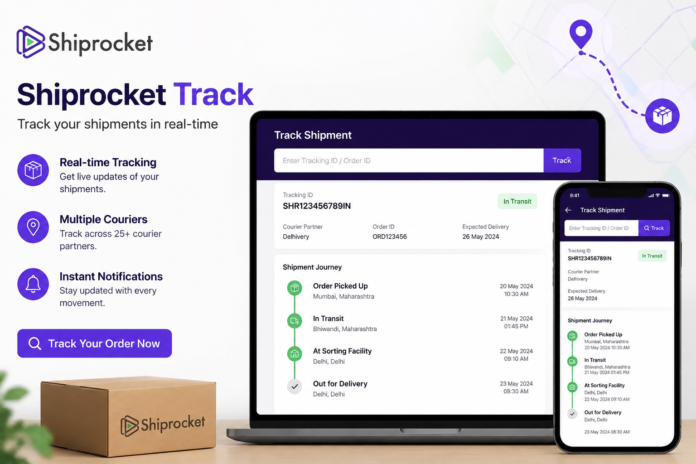

If you have ordered something online or run an e-commerce business, you have probably come across the term Shiprocket Track. Waiting for a parcel can be exciting, but it can also be frustrating when you do not know where your package is or when it will arrive. Shiprocket makes shipment tracking easier by allowing customers and sellers to check the current status of their deliveries online.
The good thing is that you usually do not need complicated technical knowledge to track a Shiprocket shipment. With the right tracking details, you can quickly check whether your package has been picked up, is in transit, has reached a nearby delivery hub, or is out for delivery. This guide explains how Shiprocket tracking works, what each status means, and what you can do if your shipment appears to be delayed.
What Is Shiprocket Track?
Shiprocket Track refers to the shipment-tracking system used to monitor packages handled through Shiprocket’s logistics network. Shiprocket works with different courier partners, so the exact delivery company handling your parcel can vary depending on the shipment. Tracking helps connect the shipment information with the package’s current delivery progress.
For customers, tracking is useful because it provides visibility after an order has been shipped. Instead of repeatedly contacting the seller and asking where the parcel is, you can use your tracking information to check the latest available update yourself.
For online sellers, shipment tracking is equally important. It helps businesses monitor deliveries, identify delays, and keep customers informed. A reliable tracking process can also improve the overall shopping experience because buyers feel more confident when they can see the progress of their orders.
How Does Shiprocket Tracking Work?
When an online seller creates a shipment through Shiprocket Track, the shipment receives tracking information. Depending on the courier service being used, a tracking number or shipment-related identification number is provided. This information is linked to the package and its movement through the delivery network.
As the parcel moves from one location to another, courier systems generate tracking updates. These updates may appear when the shipment is picked up, scanned at a facility, transferred between locations, or assigned for final delivery. The information can sometimes take a little time to appear after a physical scan.
Shiprocket Track brings shipment information together so that sellers and customers can follow the delivery journey more conveniently. Because different courier partners may be involved, tracking details and update frequency can vary from one shipment to another.
How to Track a Shiprocket Shipment
Tracking a Shiprocket Track parcel is generally straightforward. The first thing you need is the tracking information associated with your shipment. This may be available in your order confirmation, shipping notification, SMS, email, or through the seller from whom you purchased the product.
Once you have the relevant tracking details, open the Shiprocket Track tracking page or the tracking option provided with your shipment information. Enter the requested tracking number or shipment details and submit the search. The available shipment information should then appear on the screen.
The tracking page can show information such as the current shipment status, previous tracking events, delivery progress, and other relevant details. If the tracking information does not appear immediately, wait for some time and check again because a newly created shipment may not have received its first scan yet.
What Information Do You Need for Shiprocket Track?
The most important information for tracking is the shipment identifier associated with your order. Depending on the tracking method, you may be asked for a tracking number, shipment ID, or another reference connected to the delivery.
If you purchased something from an online store, check the shipping confirmation message first. Many sellers send tracking details after the parcel has been handed over to a courier partner. You may also find the information inside your order account if the store provides an online order dashboard.
If you cannot find your tracking information, contacting the seller is usually the simplest option. Give the seller your order details so they can identify the shipment and provide the correct tracking information. Avoid entering random numbers because incorrect information can return no results or show information unrelated to your order.
Common Shiprocket Tracking Statuses Explained
Understanding tracking terminology can make shipment tracking much easier. A status is simply an update describing what is happening with your parcel at a particular stage of the delivery process.
Shipment Created
A shipment created or similar initial status generally means that shipping information has been generated in the system. It does not always mean the parcel has physically started moving.
Sometimes sellers create shipping information before the courier collects the package. If the status remains unchanged for a while, the parcel may still be waiting for pickup or processing.
Pickup Scheduled
A pickup-related status indicates that the courier collection process has been scheduled or initiated. The shipment is moving toward the stage where the courier partner collects the package from the seller.
The exact timing can depend on the seller’s location, pickup schedule, courier availability, and operational conditions.
Picked Up
When a shipment is marked picked up, the courier partner has generally collected the parcel from the sender. This is an important milestone because the package has officially entered the courier network.
After pickup, you may begin seeing more location-based tracking updates as the parcel travels through sorting and transportation facilities.
In Transit
In transit means the shipment is moving through the delivery network. It may be traveling between cities, sorting centers, warehouses, or other logistics facilities.
This status does not necessarily mean the parcel is moving continuously. Packages can remain at a facility for processing before continuing to the next destination.
Out for Delivery
Out for delivery is one of the most important updates for customers. It generally means the shipment has reached the final stage and has been assigned for delivery.
However, an out-for-delivery status does not guarantee delivery at a specific hour. The actual arrival time can depend on the driver’s route, number of deliveries, traffic, weather, and other local factors.
Delivered
A delivered status indicates that the shipment has been recorded as successfully delivered. If you believe the package was marked delivered incorrectly, check with family members, neighbors, building reception, or security staff where appropriate.
If the parcel still cannot be located, contact the seller or courier support as soon as possible and provide the relevant shipment information.
Why Is My Shiprocket Tracking Not Updating?
One of the most common concerns is seeing the same tracking status for several hours or even a day. This does not automatically mean something has gone wrong. Tracking updates are usually generated when the parcel is scanned or when a new logistics event is recorded.
A package may be traveling between facilities without generating a new public tracking update. There can also be delays between a physical scan and the time the information becomes visible online.
If the status has not changed for an unusually long period, contact the seller or Shiprocket Track support for assistance. They may be able to investigate the shipment using information that is not visible on the public tracking page.
Why Is My Shiprocket Shipment Delayed?
Delivery delays can happen for many ordinary reasons. Heavy order volumes, bad weather, transportation problems, incorrect addresses, local disruptions, or courier capacity issues can all affect delivery schedules.
Another common reason is a delay at a sorting or distribution facility. A shipment may need to be processed before it can continue toward the destination city.
If your package is delayed, the best approach is to monitor the tracking information and avoid assuming the parcel is lost simply because the estimated delivery date has passed. If there are no updates for an extended period, contact the seller and ask them to raise a shipment-related query.
Shiprocket Track vs Courier Tracking
Shiprocket works with multiple courier partners, so your package may ultimately be transported by a particular courier company. This means you may sometimes see tracking information associated with both Shiprocket Track and the courier partner.
The advantage of using Shiprocket’s tracking system is convenience. Sellers can manage shipments through a single logistics platform instead of having to manage every courier relationship separately.
Courier-specific tracking can sometimes provide additional operational information, depending on the shipment and courier. If you are investigating a delayed package, checking the available tracking information from the relevant courier can sometimes provide another useful perspective.
Is Shiprocket Tracking Available for Every Shipment?
Tracking availability depends on the shipment and the information provided by the logistics system. Most properly processed shipments should have some form of tracking information, but newly generated shipments may not immediately show movement.
The amount of information displayed can also vary. Some shipments receive frequent scan updates, while others may show fewer events during transportation.
If your shipment has been handed over to the courier but tracking remains unavailable, contact the seller first. The seller can verify whether the shipment was actually picked up and whether the tracking information is correct.
Tips for Tracking Your Order More Effectively
The easiest way to avoid tracking problems is to keep your order and shipping information in one place. Save your order confirmation until the parcel arrives, especially if the purchase is expensive or time-sensitive.
Check the tracking status at reasonable intervals rather than refreshing the page every few minutes. Tracking systems update when new events are recorded, so repeatedly refreshing usually will not make a new update appear sooner.
If something looks unusual, take note of the exact tracking status and date of the last update. This makes it easier to explain the issue to the seller or support team and can help them investigate the shipment more quickly.
What Should You Do If Your Parcel Is Lost?
A shipment that has not received an update for some time is not necessarily lost. It could be delayed at a facility or waiting for another scan. However, an unusually long period without movement deserves attention.
Start by checking the latest tracking event and confirming that the delivery address is correct. Then contact the seller because the seller generally has access to shipment-management information and can initiate an investigation when necessary.
If the shipment is officially considered lost, the seller and logistics provider can follow their applicable process for resolving the issue. Keep your order confirmation, payment record, and tracking details available until the matter is resolved.
How Shiprocket Tracking Helps Online Businesses
For e-commerce businesses, tracking is more than a feature for customers. It is an important part of order management. Sellers can monitor shipments, identify delivery problems, and respond to customer questions with more accurate information.
Tracking data can also help businesses identify patterns. For example, if deliveries to a particular region regularly take longer than expected, the seller can review courier performance and make better logistics decisions.
Good tracking communication can also reduce unnecessary customer support messages. When customers can see where their orders are, they are less likely to contact a store simply to ask whether their package has been shipped.
Frequently Asked Questions About Shiprocket Track
How can I track my Shiprocket order?
You can track your shipment using the tracking information provided with your order or shipping notification. Enter the relevant shipment details into the available tracking system to view the latest status.
Why is my Shiprocket tracking not showing an update?
Tracking may not update immediately because new information usually appears after a shipment scan or logistics event. If there has been no update for an unusually long period, contact the seller for assistance.
What does “in transit” mean on Shiprocket?
“In transit” generally means the shipment is moving through the logistics network. It may be traveling between sorting centers or waiting for processing at a facility.
Can I track a Shiprocket package without a tracking number?
Usually, you need some shipment-related information to locate a parcel. If you do not have the required details, contact the seller and ask them to provide the correct tracking information.
What should I do if Shiprocket shows delivered but I have not received my package?
First, verify whether someone else at your address accepted the parcel. If you still cannot find it, contact the seller promptly and provide the order and tracking details so the delivery can be investigated.
Final Thoughts on Shiprocket Track
Shiprocket Track makes it easier for customers and online sellers to follow the progress of shipments from pickup to delivery. While tracking updates are not always instant, they provide useful information about where a package is in the delivery process.
The most important thing is to understand that tracking statuses are snapshots of logistics events rather than a live GPS location of the parcel. A short pause between updates can be completely normal. If a shipment remains unchanged for an unusually long time, contacting the seller is the best next step.
Whether you are a customer waiting for an online order or a business managing multiple deliveries, knowing how Shiprocket Track tracking works can save time and reduce unnecessary confusion. Keep your tracking information handy, understand the common shipment statuses, and check for updates when needed. With these simple habits, following your parcel becomes much easier.
You May Also Read: Image Resizer